On this page
OpenAPI Schema Validation
This page explains how to use OpenAPI schema validation with Pipelines-as-Code Repository CRs to catch configuration errors early and get IDE autocompletion.
Pipelines-as-Code provides OpenAPI schema validation for its Custom Resource Definitions (CRDs). This validation helps you catch configuration mistakes early when writing Repository resources.
What is OpenAPI Schema Validation?
OpenAPI schema validation is a mechanism that adds metadata to Kubernetes CRDs, providing:
- Type information: Specifies expected data types for fields
- Required fields: Marks which fields must be present
- Pattern validation: Enforces specific formats (e.g., URLs must start with http:// or https://)
- Enumeration validation: Limits fields to a predefined set of values
- Field descriptions: Documents the purpose of each field
When you create or modify a Repository resource, the OpenAPI schema helps validate your configuration before it’s applied to the cluster, catching errors early in the development process.
Benefits of OpenAPI Schema Validation
Using OpenAPI schemas with Pipelines-as-Code gives you the following advantages:
- Early Error Detection: Identifies configuration errors before applying resources to your cluster
- Improved Documentation: Field descriptions provide built-in documentation
- Better IDE Support: Enables rich autocompletion and validation in code editors
- Standardized Formatting: Ensures your resources follow expected formats
- Self-Documenting API: Makes it easier to understand the Repository CR structure
Using OpenAPI Schemas in VS Code
Visual Studio Code and other modern editors can use OpenAPI schemas to provide real-time validation, autocompletion, and documentation while you edit Repository resources.
Setting Up VS Code for CRD Validation
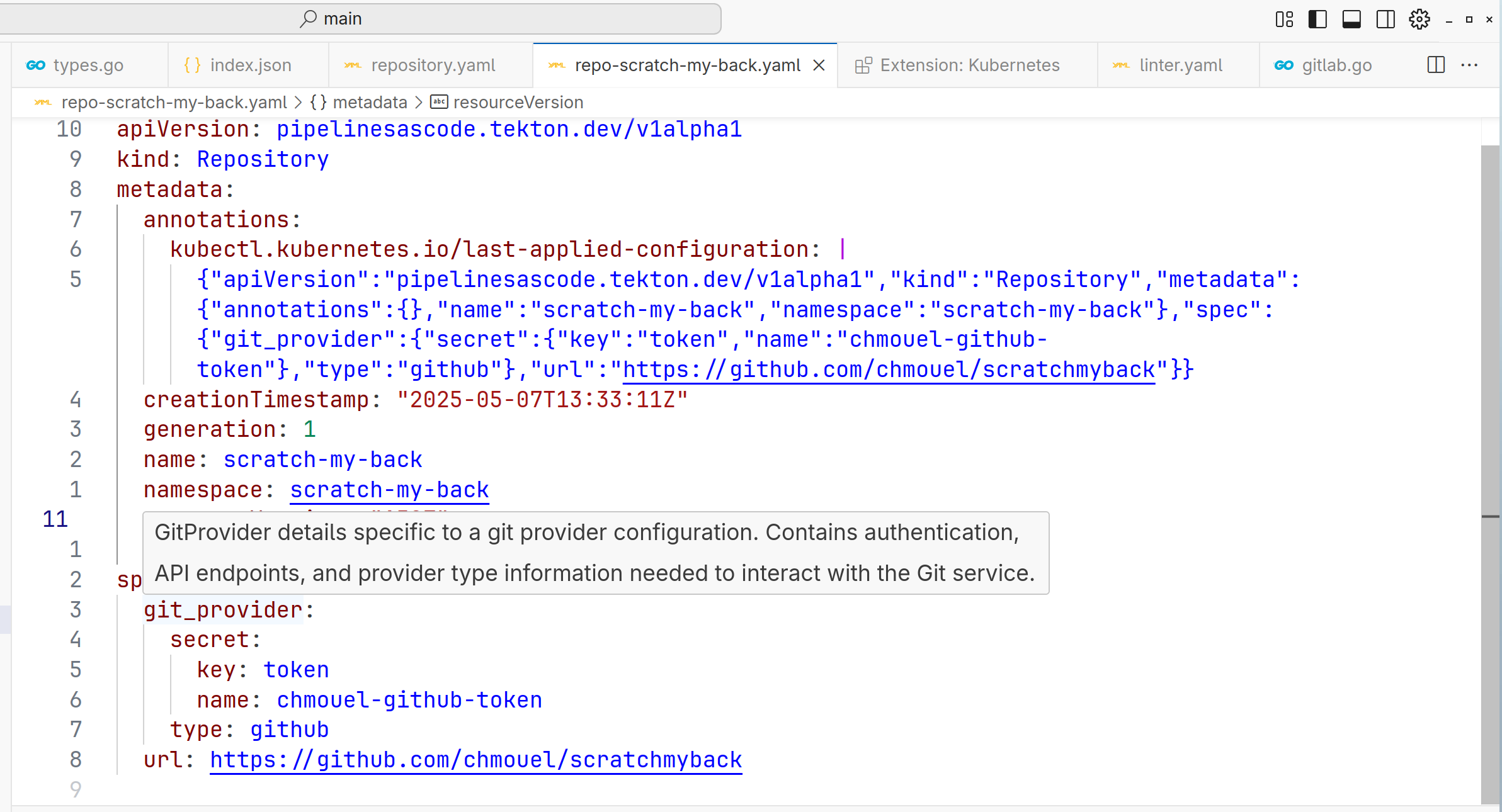
- Install the Kubernetes extension (by Microsoft)
- Install the YAML extension (by Red Hat)
These extensions automatically detect and use the OpenAPI schema from your Kubernetes cluster when you edit Repository resources.
Example: Editing a Repository Resource in VS Code
When you edit a Repository resource in VS Code with the appropriate extensions, you get:
- Autocompletion for fields like
url,git_provider,settings, etc. - Validation for required fields and field formats
- Documentation tooltips when hovering over fields
- Enum dropdown suggestions for fields with predefined values
Here is an example of what you see:
apiVersion: pipelinesascode.tekton.dev/v1alpha1
kind: Repository
metadata:
  name: my-repository
spec:
  # VS Code will show an error if this required field is missing
  url: https://github.com/myorg/myrepo

  # Autocompletion will suggest all available fields
  git_provider:
    # Dropdown will show available provider types
    type: github

    # Pattern validation ensures the URL format is correct
    url: https://api.github.com

    # Documentation tooltips show field descriptions
    webhook_secret:
      name: webhook-secret
      key: token

  # Validation for minimum values
  concurrency_limit: 5

  settings:
    # Enum validation limits to specific options
    pipelinerun_provenance: default_branch
Other Tools Using OpenAPI Schemas
Beyond VS Code, OpenAPI schemas are useful with:
kubectl: Validates resources before applying them
kubectl create -f my-repository.yaml --validate=truekube-linter: Validates resources as part of CI/CD pipelines
Kubernetes Dashboard: Shows field descriptions and validations
OpenAPI documentation generators: Create API documentation from schemas
How to Get the OpenAPI Schema
The OpenAPI schema for Repository resources is embedded in the CRD itself. You can inspect it with:
kubectl get crd repositories.pipelinesascode.tekton.dev -o jsonpath='{.spec.versions[0].schema.openAPIV3Schema}' | jqOr to see all available fields with their descriptions:
kubectl explain repository.spec --recursiveTroubleshooting Schema Validation Errors
If you encounter validation errors when creating or updating a Repository:
- Check field types: Ensure values match expected types
- Verify required fields: Make sure all required fields are present
- Review pattern validations: URLs must follow the correct format
- Check enum values: Some fields accept only specific values
Error messages typically include specific details about which validation failed, making it straightforward to correct your resources.