On this page
Commands on Pushed Commits
This page explains how to trigger GitOps commands on pushed commits. Use these commands when you want to retest or cancel PipelineRuns triggered by push events rather than pull requests.
This feature is supported on the following providers:
| Git Provider | Supported |
|---|---|
| GitHub App | ✅ |
| GitHub Webhook | ✅ |
| Forgejo | ❌ |
| GitLab | ✅ |
| Bitbucket Cloud | ❌ |
| Bitbucket Data Center | ❌ |
You can trigger GitOps commands on a pushed commit by including them in your commit messages. Pipelines-as-Code supports two scopes:
- Restart all PipelineRuns: Use
/retestor/testwithin your commit message. - Restart a specific PipelineRun: Use
/retest <pipelinerun-name>or/test <pipelinerun-name>within your commit message. Replace<pipelinerun-name>with the name of the PipelineRun you want to restart.
Pipelines-as-Code triggers a PipelineRun only on the latest commit (HEAD) of the branch and ignores older commits.
In practice, this means:
When you comment with commands like
/retestor/teston a branch without specifying a branch name, Pipelines-as-Code runs the test on the default branch (for example,mainormaster) of the repository.Examples:
/retest/test/retest <pipelinerun-name>/test <pipelinerun-name>
If you include a branch specification such as
/retest branch:testor/test branch:test, Pipelines-as-Code runs the test on the commit where you placed the comment, using the context of the test branch.Examples:
/retest branch:test/test branch:test/retest <pipelinerun-name> branch:test/test <pipelinerun-name> branch:test
The /ok-to-test command does not work on pushed commits. It exists specifically for pull requests, where it authorizes CI for external contributors. Since only authorized users can issue GitOps commands on pushed commits, no separate authorization step is needed.
For example, when you execute a GitOps command like /test test-pr branch:test on a pushed commit, verify that test-pr exists on the test branch in your repository and includes the on-event and on-target-branch annotations as shown below:
kind: PipelineRun
metadata:
  name: "test-pr"
  annotations:
    pipelinesascode.tekton.dev/on-target-branch: "[test]"
    pipelinesascode.tekton.dev/on-event: "[push]"
spec:
The following sections show how to add a GitOps comment on a pushed commit in each supported Git provider.
For GitHub
- Go to your repository.
- Click on the Commits section.
- Choose an individual Commit.
- Click on the line number where you want to add a GitOps comment, as shown in the image below:
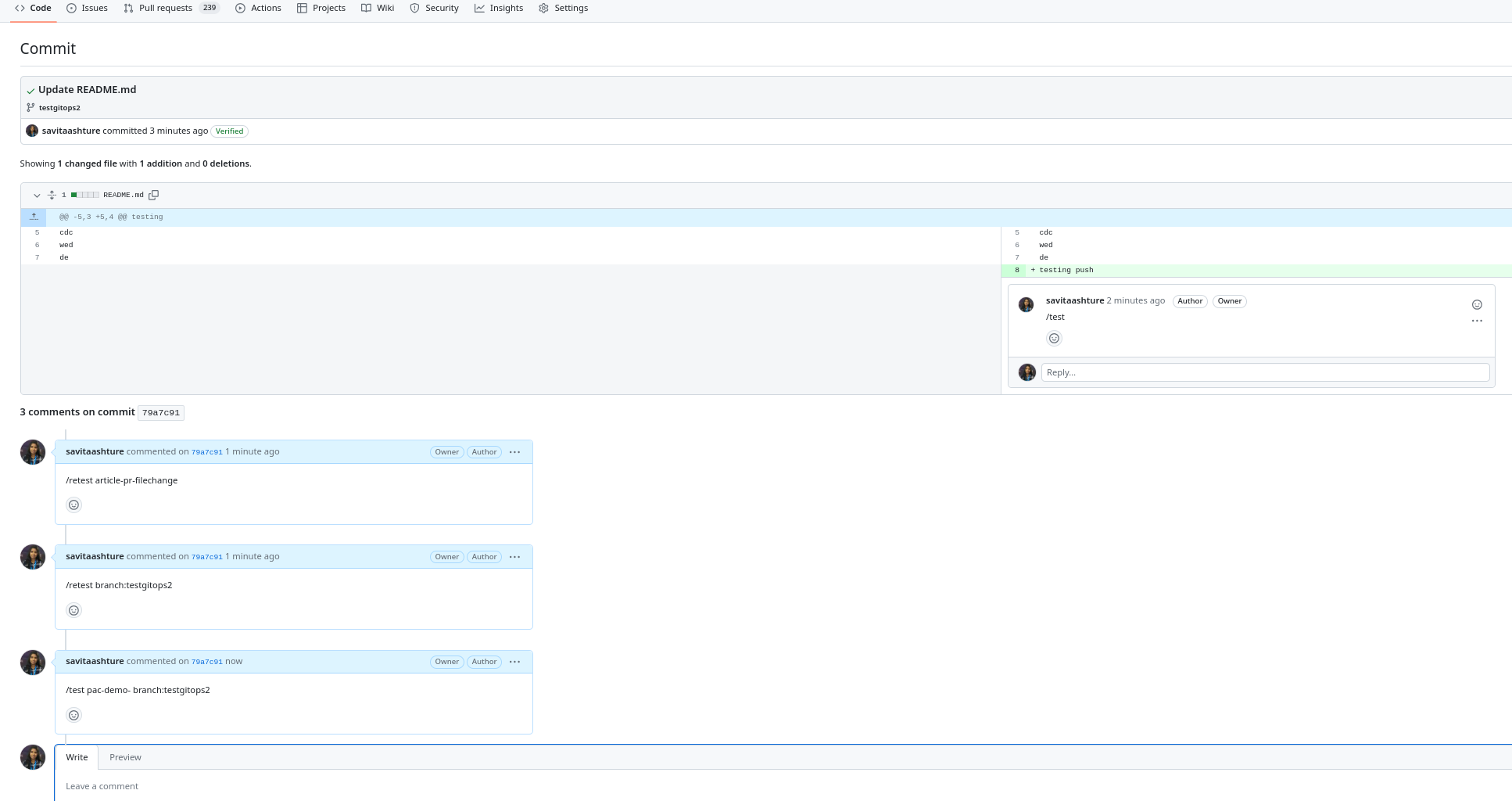
For GitLab
- Go to your repository.
- Click on History.
- Choose an individual Commit.
- Click on the line number where you want to add a GitOps comment, as shown in the image below:

GitOps Commands on Non-Matching PipelineRuns
What it does: When you use /test <pipelinerun-name> or /retest <pipelinerun-name>, Pipelines-as-Code restarts the named PipelineRun regardless of its event-matching annotations.
When to use it: You have PipelineRuns that are designed to run only when triggered by a comment on a pull request, and you want to force one to run.
Triggering PipelineRuns on Git Tags
This feature is supported on the following providers:
| Git Provider | Supported |
|---|---|
| GitHub App | ✅ |
| GitHub Webhook | ✅ |
| Forgejo | ❌ |
| GitLab | ✅ |
| Bitbucket Cloud | ❌ |
| Bitbucket Data Center | ❌ |
What it does: You can retrigger a PipelineRun against a specific Git tag by commenting on the tagged commit. Pipelines-as-Code resolves the tag to its commit SHA and runs the matching PipelineRun against that commit.
When to use it: You want to rerun or cancel pipelines associated with a tagged release.
Supported commands:
/test tag:<tag>: retrigger all matching PipelineRuns for the tag commit/test <pipelinerun-name> tag:<tag>: retrigger only the named PipelineRun/retest tag:<tag>: retrigger all matching PipelineRuns for the tag commit/retest <pipelinerun-name> tag:<tag>: retrigger only the named PipelineRun/cancel tag:<tag>: cancel all running PipelineRuns for the tag commit/cancel <pipelinerun-name> tag:<tag>: cancel only the named PipelineRun
Examples:
/test tag:v1.0.0or
/retest tag:v1.0.0/cancel tag:v1.0.0/cancel pipelinerun-on-tag tag:v1.0.0/test pipelinerun-on-tag tag:v1.0.0Keep these points in mind:
- Pipelines-as-Code treats the event type as
push, so configure your PipelineRun withpipelinesascode.tekton.dev/on-event: "[push]". - This feature currently works on GitHub (App and Webhook) only.
Minimal PipelineRun example:
apiVersion: tekton.dev/v1beta1
kind: PipelineRun
metadata:
  name: pipelinerun-on-tag
  annotations:
    pipelinesascode.tekton.dev/on-target-branch: "[refs/tags/*]"
    pipelinesascode.tekton.dev/on-event: "[push]"
spec:
  pipelineSpec:
    tasks:
      - name: tag-task
        taskSpec:
          steps:
            - name: echo
              image: registry.access.redhat.com/ubi10/ubi-micro
              script: |
                echo "tag: {{ git_tag }}"
To comment on a tag commit in GitHub:
- Go to your repository and open the Tags view (or Releases).
- Click the tag (for example,
v1.0.0) to navigate to its commit. - Add a comment on the commit using one of the commands listed above.