On this page
Advanced Commands
This page covers advanced GitOps command features. Use these capabilities when you need to go beyond basic /test and /retest commands – for example, reading the triggering comment, defining custom commands, cancelling runs, or passing parameters.
Accessing the Comment Triggering the PipelineRun
What it does: When you trigger a PipelineRun via a GitOps command, Pipelines-as-Code sets the template variable {{ trigger_comment }} to the full text of the comment that triggered it. You can then use this value in shell scripts or other steps to make decisions based on the comment content.
Important: Expanding {{ trigger_comment }} directly in YAML can break parsing if the comment contains newlines. For example, a GitHub comment like:
/help

This is a test.
Expands to:
params:
  - name: trigger_comment
    value: "/help

This is a test."
The empty line makes the YAML invalid. To prevent this, Pipelines-as-Code replaces \r\n with \n to ensure proper formatting. You can restore the newlines in your task as needed.
For example, in a shell script, use echo -e to expand \n back into actual newlines:
echo -e "{{ trigger_comment }}" > /tmp/comment
grep "/help" /tmp/comment # will output only /help
This ensures the comment is correctly formatted when processed.
Custom GitOps Commands
What it does: The on-comment annotation lets you define your own GitOps commands that trigger specific PipelineRuns when someone comments on a pull request.
When to use it: You want to go beyond the built-in /test, /retest, and /cancel commands and create domain-specific commands for your workflow. See the on-comment guide for full details.
For a practical example, see the pac-boussole project, which uses the on-comment annotation to create a PipelineRun experience similar to Prow.
Cancelling a PipelineRun
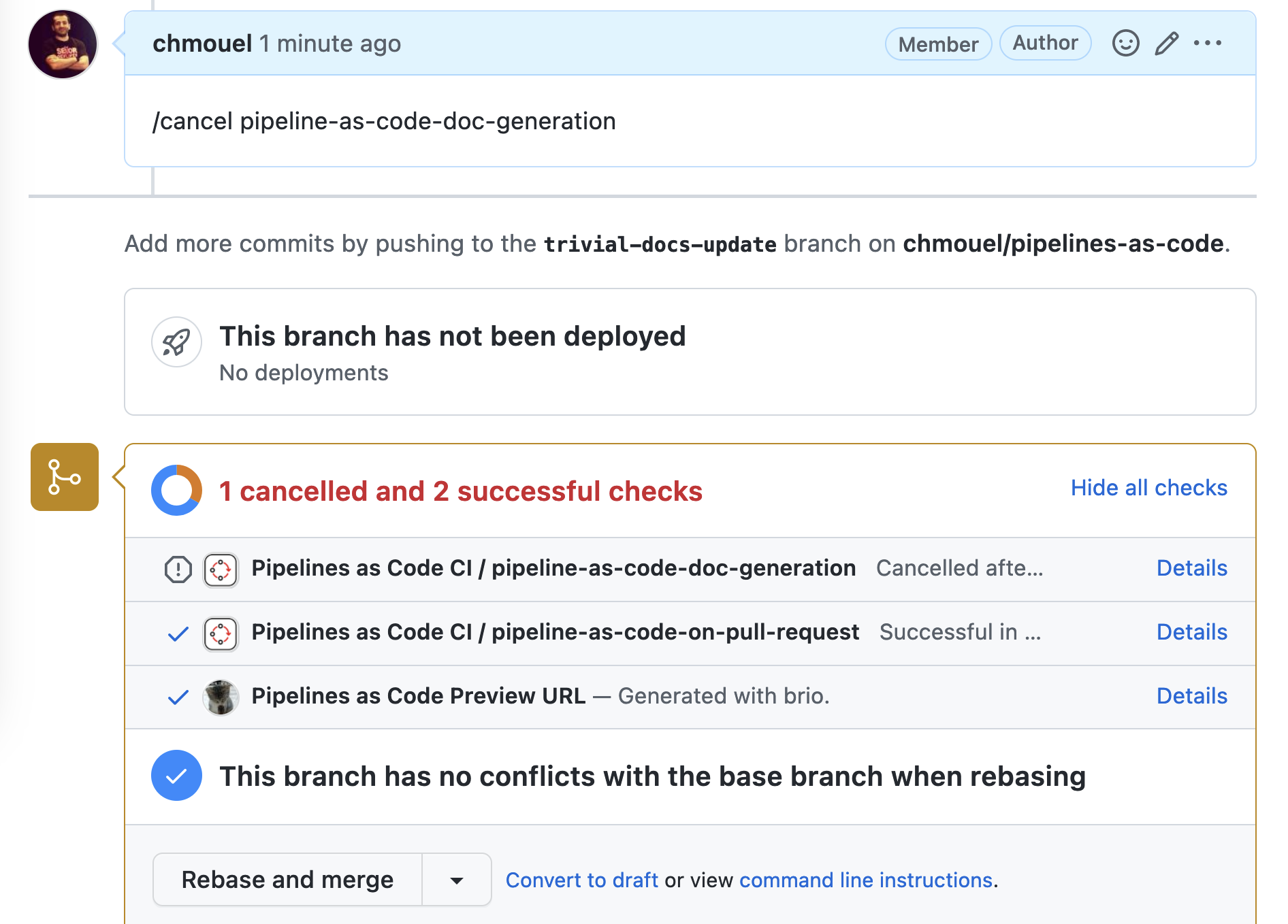
What it does: The /cancel command stops running PipelineRuns by commenting on the pull request.
When to use it: A pipeline is running against outdated code, or infrastructure issues make the current run pointless. To cancel all PipelineRuns on a PR, add a comment starting with /cancel. Pipelines-as-Code cancels every PipelineRun attached to that pull request.
Example:
The infrastructure appears to be experiencing issues. Cancelling the current PipelineRuns.

/cancel
To cancel only a specific PipelineRun, append its name to the /cancel command.
Example:
The infrastructure appears to be experiencing issues, cancelling this specific pipeline.

/cancel <pipelinerun-name>
When you use the GitHub App, Pipelines-as-Code sets the pipeline status to cancelled.
Cancelling a PipelineRun on a Push Event
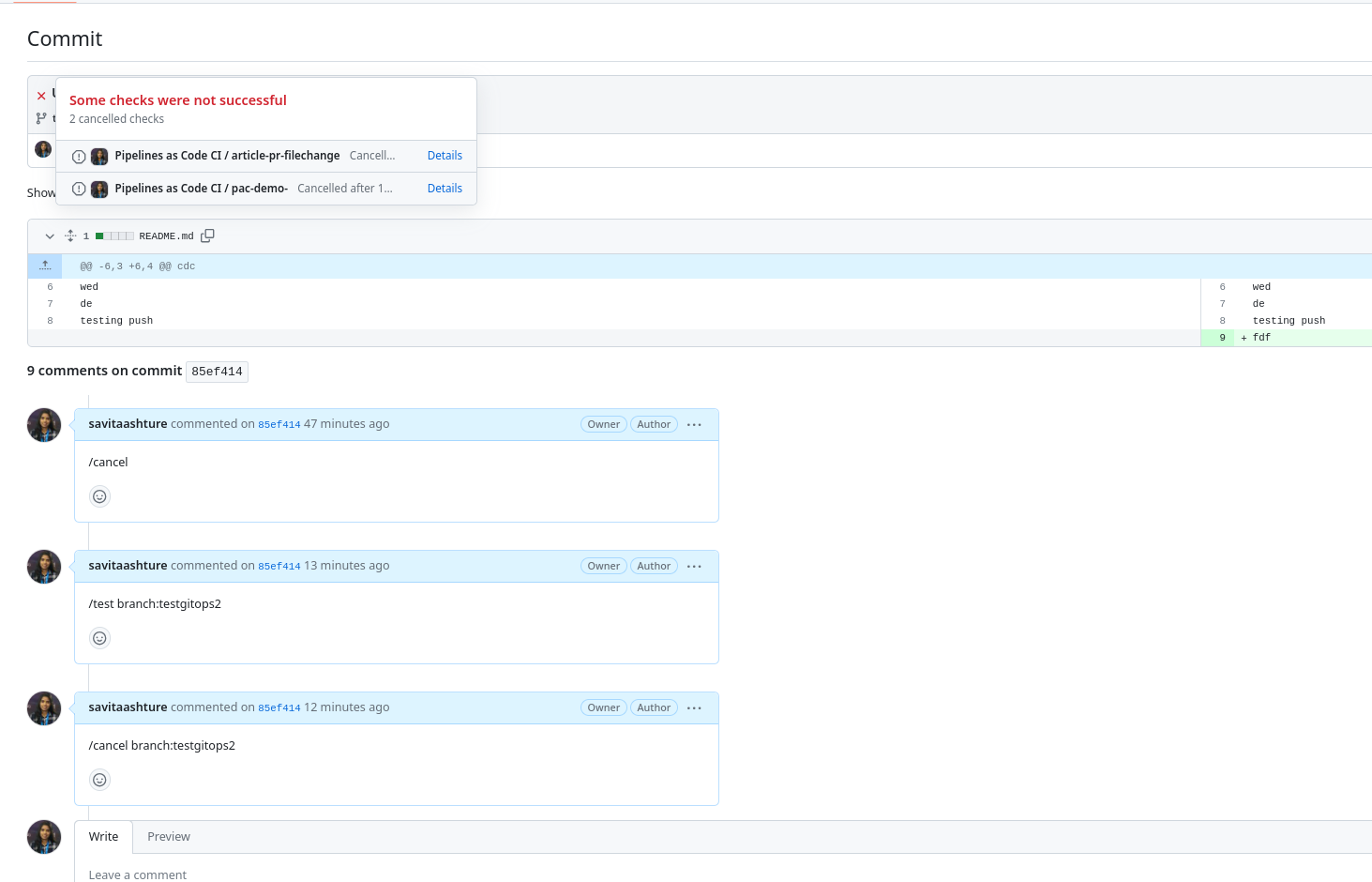
You can also cancel a running PipelineRun by commenting directly on the commit rather than on a pull request.
Example:
- Use
/cancelto cancel all PipelineRuns. - Use
/cancel <pipelinerun-name>to cancel a specific PipelineRun.
This means:
If you use
/cancelwithout any argument in a comment on a branch, Pipelines-as-Code automatically targets the main branch.Examples:
/cancel/cancel <pipelinerun-name>
If you issue
/cancel branch:test, Pipelines-as-Code targets the commit where you placed the comment but uses the test branch.Examples:
/cancel branch:test/cancel <pipelinerun-name> branch:test
When you use the GitHub App, Pipelines-as-Code sets the pipeline status to cancelled.
This feature is currently supported on GitHub only.
Passing Parameters to GitOps Commands as Arguments
Passing parameters to GitOps commands as arguments is a Technology Preview feature only. Technology Preview features are not currently supported and might not be functionally complete. We do not recommend using them in production. These features provide early access to upcoming Pipelines-as-Code features, enabling you to test functionality and provide feedback during the development process.
What it does: You can pass key-value arguments to GitOps commands, overriding standard dynamic variables or custom parameters at trigger time.
When to use it: You need to change a parameter value for a single run without modifying the PipelineRun definition. For example:
/test pipelinerun1 key=valuePipelines-as-Code sets the custom parameter key to value (provided key is already defined as a custom parameter).
Keep these rules in mind:
- Pipelines-as-Code only parses comments that start with
/. - You can only override standard dynamic variables or previously defined custom parameters; you cannot introduce arbitrary new parameters.
- You can place
key=valuepairs anywhere in your comment, and Pipelines-as-Code parses them.
The following formats are accepted, allowing you to pass values with spaces or newlines:
- key=value
- key=“a value”
- key=“another "value" defined”
- key=“another value with newline”
Event Type Annotation and Dynamic Variables
What it does: Pipelines-as-Code sets the pipeline.tekton.dev/event-type annotation on every PipelineRun to indicate which GitOps command triggered it. You can inspect this annotation to understand how a run was initiated.
The possible event types are:
test-all-comment: A/testcommand that tests every matched PipelineRun.test-comment: A/test <PipelineRun>command that tests a specific PipelineRun.retest-all-comment: A/retestcommand that retests every matched failed PipelineRun. If a successful PipelineRun already exists for the same commit, Pipelines-as-Code does not create a new one.retest-comment: A/retest <PipelineRun>command that retests a specific PipelineRun.on-comment: A custom comment that triggers a PipelineRun.cancel-all-comment: A/cancelcommand that cancels every matched PipelineRun.cancel-comment: A/cancel <PipelineRun>command that cancels a specific PipelineRun.ok-to-test-comment: An/ok-to-testcommand that authorizes CI for an external contributor. If a successful PipelineRun already exists for the same commit, Pipelines-as-Code does not create a new one.
If a repository owner comments /ok-to-test on a pull request from an external contributor but no PipelineRun matches the pull_request event (or the repository has no .tekton/ directory), Pipelines-as-Code sets a neutral commit status. This signals that no PipelineRun matched, allowing other workflows – such as auto-merge – to proceed without being blocked.
When using the {{ event_type }} dynamic variable for the following event types:
test-all-commenttest-commentretest-all-commentretest-commentcancel-all-commentok-to-test-comment
Pipelines-as-Code returns pull_request as the event type instead of the specific categorized GitOps command type. This behavior maintains backward compatibility for users who rely on this dynamic variable.
Pipelines-as-Code currently logs a warning in the repository’s matched namespace. A future release will change this behavior to return the specific event type instead.